After finishing a live show with Christine Vallaure last week, she sent me a message asking about the setup for my show. At first I remembered that I made a post about the behind-the-scenes of the show on this blog, but then I saw the date—two and a half years ago. A lot has changed since then, and I felt this was a good time to share what has changed.
Concept
In the original post, I spoke about how important it was for me to have a workflow behind this to make it as easy as possible to produce a show. The necessity of having a workflow hasn’t changed, but the parts of that workflow have. Using the same style of list from the original post, here’s a breakdown of what I wanted:
- A live show, since the editing process was a bottleneck.
- Automatic video clipping, again to avoid editing.
- Automatic podcast creation, for audio syndication.
- Easy guest scheduling, to provide more voices on the show.
- Minimal content follow-up, because this isn’t my full-time thing.
Pre-production
Since the beginning, the show has not had much pre-production. Whether or not I made a show was largely based on if I found anything interesting to talk about that day. Even when the show became live, I didn’t want to put too much effort into the daily preparation. When the show was first live on LinkedIn, I’d need to schedule when I was going live because it needed to be tied to an event. I also needed to create the thumbnail which I think I was reusing from each episode since I was trying to reduce the time spent.
Eventually, I moved to YouTube (more on why below) where it is more critical about having a quality thumbnail associated with each show. I found a template on Adobe Express that I really liked. So much so that it became the general branding and look for the show; the crumpled paper and bold blue & green colors. I’ve been avoiding the trend of putting some ridiculous face on the image since the beginning, but I will say it’s hard to find a particular episode by sight in the sea of similar images. I’m considering revisiting this in the future.
Now before each show, the main unit of work I need to do is create the thumbnail in Adobe Express (the web page tab just stays open) and upload it to the YouTube live site. Set the title and podcast playlist, and the setup is basically ready to go live on the digital side.
Video
On the physical side, I begin by powering on all of the equipment. Then I turn on 3 OBSBot Tail 2 cameras. I use these because I’m really bad at calibrating cameras, and these make it easy to have a great picture. I originally also got these so they could stream video wirelessly via NDI. However, when testing that, the audio and video were out of sync, so now they are wired directly to the switcher.
Speaking of the switcher, I’ve upgraded that too. My original Roland SR-20HD really didn’t have enough inputs for a multicam show. So I upgraded to the Roland VR-6HD. This has 6 HDMI inputs and 3 HDMI outputs. It can also act like a webcam over USB-C, so guests can hear and see me using the inputs of the device.
Before, when it was just me, there wasn’t much reason to switch cameras. It’s why I was able to get away with the lesser Roland switcher for so long. I made the mannequin to test what having guests would be like. I used character.ai to fill in as a sidekick and get the feel for switching cameras. I quickly realized that turning to find the right button on the switcher was awkward during the show. The newer switcher allows for foot pedals to trigger switching. So you’ll notice the live camera switching in the show while my hands are fully in view. It makes it look like there’s a team behind this, but it’s really me trying to host and direct the show all at once. I now have a pattern that I typically stick to: host cam, guest cam, cross fade to the full video call, switch to another cam when the guest wraps up or goes on for a while, repeat. Having a pattern like this helps me stay in the conversation without context-switching to director brain for too long.
Audio
Audio is the hardest problem to solve, and this is because of guests.
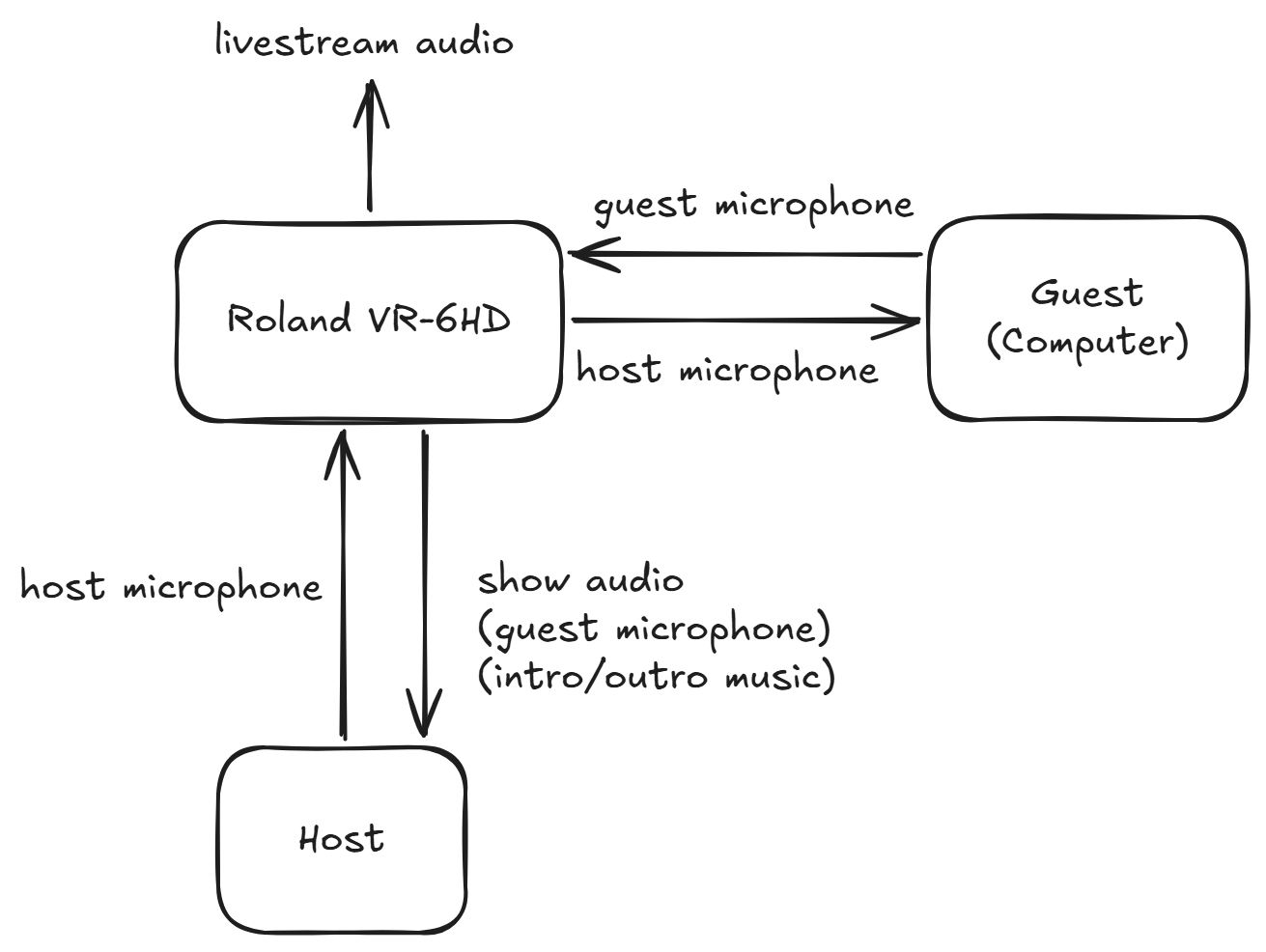
In the diagram, the Roland VR-6HD must accept 2 incoming channels of audio and 3 outgoing channels. The host audio is the same as the livestream, it’s the main mix of the show. However, I cannot have that mix go to the guest. The guest should only receive the audio from my microphone. The easier way to do this would have been to have a separate webcam meant just to capture the audio sent to the guest for the call, but instead I’ve routed the Roland VR-6HD to act like a webcam and direct only my audio to them.
The other thing about audio has to do with the intro/outro of the show. If you’ve watched the show, you may have noticed that sometimes the guest and I look like we’re talking to each other while the music is playing. This is because I have a macro that cuts both of our mics for the livestream but not for my headset. That’s another audio output mix I had to make that’s not really captured in the diagram because it would be too complex to include. That configuration is also only used in the first and last few minutes of the show, but I think it really gives it the talk show feel.
Guests
Related to pre-production, I knew that I wanted to schedule guests. Before creating a new multicam set for the show, I had put out a casting call for folks who might want to be on the show. My biggest problem with guests was the way I was producing the show.
I can’t tell you the number of times someone has suggested that I use an existing platform for getting guests on the show, for example Descript, which I already had a paid account for. The issue was that this would require everything to be done in Descript, which made Descript the single point of failure. If my computer crashed or even just the browser, the show was over. This is the main reason why I use dedicated hardware and not a computer to do everything. The computer has been the place where failures happen, and I really wanted to not rely on it for the show. So I was looking for dedicated hardware to manage guest calls. I couldn’t find anything, so I settled for including a computer to handle guest calls, but I didn’t want it to be a standard split screen. Even now with dozens of shows completed, this computer still causes me grief. Like when it decided it had to restart right in the middle of my interview with Jason Lengstorf, or, most recently, when it wanted to notify me about some service while speaking with Dan Mall. It’s junk like this that makes me want to get a dedicated device.
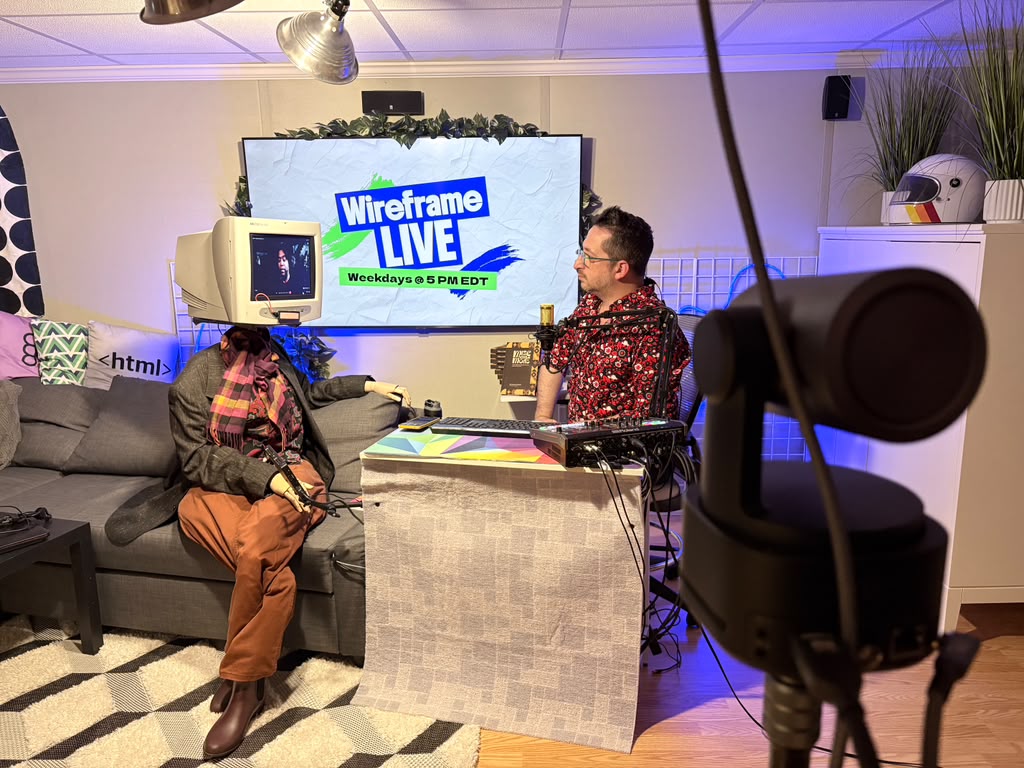
Probably the show’s defining feature is the mannequin on the couch next to me with the head of a CRT monitor. I’ve been told it gives local-access TV vibes, but the reason why I included this is specifically because I wanted a multicam setup, and that doesn’t work well when one person is virtual. So I’ve designed it so the person is semi-virtual. This makes it feel more like a real talk show where I can address the guest next to me like we’re both in the room.
Scheduling guests is now just a small form on the site that everyone goes through. It even includes an “Inspire Me” button for people who I’d like to have on but don’t know what to talk about. It’s not AI—it’s just cycling through some predetermined templates and words. The purpose of this is to kick off a workflow that helps schedule the guests. This sends a calendar link so they can choose when to go live on the show. The calendar (loosely) follows my availability to go live, so the day chosen is really up to the guest, as well as the topic to talk about. We’ve talked about reading systems, heist movies, layoffs, and other things of interest. The guests really make the show what it is today, which I now call a variety talk show with some relation to tech either by topic or by guest.
Going live
When I first started Wireframe, it worked like a normal podcast. It was audio-only even though I was recording to YouTube just for free media storage. If I remember correctly, Descript might have been able to auto-detect the videos I uploaded then, I don’t remember exactly. But what I did know was that I’d have to replay the episode I had just gone through again, which I didn’t enjoy at all. Even with text-based editing cutting the traditional editing time down significantly, just going through the episode again after living it was a time suck. I needed to drop the editing altogether. I needed to do it live.
At first, I avoided YouTube for this because the engagement there is questionable at best. People can hide behind fake names and bot accounts. I really wanted to have a professional-feeling show with professionals tuning in. That’s why I originally went live on LinkedIn. For the first few episodes, this worked OK but not great. Until one day…
I went to go live and LinkedIn just wouldn’t. I thought it might have been some setting on my equipment, but it wasn’t. LinkedIn just isn’t a first-class platform to go live. I knew that if I was going to have scheduled guests in the future, I couldn’t use a platform that was just going to fail for no reason. I needed something that was made for video, so I went back to YouTube.
I will say I’ve considered dual-streaming to LinkedIn since then, but since it’s clunky to set up, I’ve been dragging my feet on it. The one-hundredth episode of Wireframe Live is coming soon, so maybe I’ll make something special out of it. 👀
Post-production
Just like the original show, I didn’t want to go through a lot of post-production. After editing the show, I’d manually upload the audio to Acast and then it would eventually be available through the RSS feed. Once it was available, I had an admin page on the original website that would help me create the related webpage for the episode. I needed to provide the .srt file, and it would render the .md from that for Astro to present.
Since then, my post-production process has changed significantly. Since YouTube is the main host of the content, I don’t really need to have individual pages on my website for these things. YouTube does a better job with this ecosystem, including searchable transcripts and comments.
I still liked having an audio version of the show, but I didn’t want to manually upload each episode. I wanted some service that would find the latest video and make a podcast episode out of it. The service I found to do this is PodBean. It also makes syndication to everyone’s favorite listening apps very easy, mostly one-click connections. This service also produces the audio RSS feed for any other services that a person might connect. At the time of this writing, the podcast version has 2.5K downloads, which I think is pretty good since I don’t promote the audio version of it at all.
Early on, I noticed it was really hard to get people to watch the show live. One of the pieces of feedback I got about it was “you’re trying to feed them an entire cake when you haven’t given them a taste yet.” That was a note about how it’s common for longer videos to have shorter clips that highlight certain moments. I thought this was a good idea to grow interest in the larger videos, but traditionally, this would also go back to the editing issue. Luckily, I found OpusClip, which is not only able to find good clips from the video provided but can also automatically find the video uploaded to a particular channel. That means all I need to do is review the clips that are found and schedule them. It takes roughly 20 minutes the day after the show to allow people to get the gist of the show in a few seconds.
The last thing that happens after the show is the YouTube description update. For a long time, I just ignored this, but eventually felt that the one function I worked on for a while in the original site, jumping to a section in the show, would be helpful for people looking for a certain topic in the show quickly. Traditionally, this would require at least reviewing the transcript to determine the topics that were spoken about. However, this is a place where AI has really helped. I have a small GitHub workflow that checks the YouTube API for the latest live show, grabs the transcript and sends it to Gemini for the chapters and summary, and then goes back to YouTube to update the description.
Reflection
I’ll say the conversation I had with Dan Mall yesterday, who recently started his own YouTube journey, gave me some inspiration for next steps. At the end of the show, we talked about thumbnails, and while you might think this would have just been a few nerds talking about how to optimize this, the real advice was that if you want great results, you need to put in great effort. All the effort I put in to go live could be wasted on poor packaging (i.e., the thumbnail). All of the time-saving I do could be revisited to improve the quality in areas where it’s lacking. The one thing that is missing is feedback.
So if you have feedback on the show, I’d love to hear it. You can leave it as a comment on a video or find me on the socials. If you’re daring, maybe you can give me the feedback live on the show and I’ll improve it right there. Could be fun?